No public Twitter messages.
Posts Tagged ‘Google Analytics’
Google Analytics Tools for NPOs from the 2013 Nonprofit Technology Conference
Last week, our team attended the Nonprofit Technology Conference in Minneapolis! We are posting our recaps and resources from the conference over on the Tendenci website. For The SEM Blog, we’ve included some tools from speaker Justin Cutroni of Google. Justin presented on Google for Nonprofits and Smart Data.

The Schipul/Tendenci team at NTC 2013!
Analytics tools for nonprofits (really any organization can benefit from these tools!):
1. Cross Domain Tracking
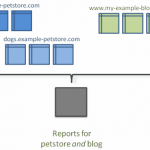
Many sites we work with (including our own!) is made up of multiple domains. The multiple domains can be tricky with reporting because reports falsely list bounces and referrals as people go from one internal site to another. This can be explained… but it is not always clear from just looking at a single report.
The solution: Cross Domain Tracking from Google Analytics
![]()
2. The Measurement Protocol
You can track anything in Google Analytics now. The Google Analytics Measurement Protocol allows developers to make HTTP requests to send raw user interaction data directly to Google Analytics servers. This allows developers to measure how users interact with their business from almost any environment. Developers can then use the Measurement Protocol to: Measure user activity in new environments, tie online to offline behavior, and send data from both the web and server.
It even has structure for financial data, for instance: &tr=50.00 // Transaction revenue. &ts=32.00 // Transaction shipping. &tt=12.00 // Transaction tax.
Learn More on Google’s Developer Documentation
3. Link Tagging
Google URL tagging it is really powerful to mix the protocol data with campaign data. You can then filter your analytics data by campaign passed through a link tag. Powerful stuff!
Learn more about Google Analytics URL Builder for an example of how the variables would be added
More Nonprofit Technology Conference Recaps!
Check out our other recaps and resources from the Nonprofit Technology Conference!
- Panel Recap: Level Up Your Online Fundraising!
- Video Webinar On Demand: NTC Highlights
- NTC Recaps and Resources Landing Page
Schedule Your Reporting in the New Google Analytics
They say change is a good thing, but it isn’t always easy. SEOs everywhere are experiencing the big change taking place with Google phasing out the old version of Google Analytics. It seems like Google is itching for the “old version” of Analytics to go away. The only way to even get to the old version currently is by clicking the link in the footer. There’s no telling when that link will go away, so make the switch ASAP if you haven’t already.
Google recently sent out emails alerting everyone that the old version of Analytics reporting will end in June 2012. We see the good in the new Analytics and there is a lot more data to play with. However, this is a headache because all of the automatic reports you set up in the old Analytics will need to be made again in the new Analytics. This is good news and bad news. It’s good because it gives you the opportunity to revisit your dashboard and customize it. Unfortunately for agencies this is bad news because all of the hundreds of reports we have automated will be gone! We encourage our clients to log into their Analytics and get familiar with the data. This is the perfect time for them to customize their dashboards to display the data they’re most interested in seeing.
If you need a little help getting started we’ve simplified it for you — 3 Quick Steps to Set Up Email Reports in the New Google Analytics
The Familiarity Effect: PPC vs Organic Search
Dave Underwood of Topspot Internet Marketing spoke on “Improving Website Measurement & Analytics” at the HiMA luncheon last week in Houston, Texas.
He offered useful insight for successful marketing, some of it surprisingly simple. For example, recording and listening to phone calls: if your sales people give inaccurate information or fail in some other way to appropriately respond to potential customers, it really doesn’t matter if your marketing campaign generates 100 leads from Fortune 500 companies – the sales people are not converting the leads.
He also touched on the hot topic of Organic vs. Paid advertising. Agreeing with a study by Google showing that 89% of the clicks generated by paid ads would not be generated by organic search*, he recommends maintaining a PPC campaign even when your Organic rank is high.

The idea is explained by the basic psychological principle that humans prefer familiar things – the more times customers see or hear about a product or company the more likely they are to trust or prefer it.
Think of Billboard charts: the average song increases in popularity for about 6 or 7 weeks, meaning that people like it more as they become more familiar with it. For brands and companies familiarity drives brand equity: the recession resulted in a 30% earnings decline for companies overall, whereas familiar, trusted Best Global Brands saw only a 4% decline in earnings.
In other words:
People need to see your company lots of times, in lots of places (PPC and search lists), and they need to keep seeing your company show up over time.
* Clearly Google is incentivized to present their findings in a way that encourages companies to pay for advertising, and indeed analysts point out the limitations of Google’s interpretation of their results (Google presents an average rate of Incremental Ad Clicks unique to PPC, and doesn’t explicitly talk about the fact that lower IAC means your PPC is “cannibalizing” more of your organic clicks). In general though, there’s over half a century of robust research demonstrating the familiarity effect, so shelling out for those paid ads is probably worth it for your company.
VIDEO: Deciphering a Keyword Report & The SEO Hierarchy of Needs – PRSA Tampa Bay
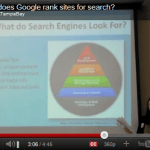
Last month I visited Florida to speak to PRSA Tampa Bay on SEO for PR Professionals. The fantastic team at PRSA Tampa Bay captured video of the event, and two excerpt videos from that presentation are below:
Deciphering Google Analytics Keyword Reports
How to read keyword reports from Google Analytics – what should you do with this information?
- You should rank well for your brand name – you are the best answer for that search query
- Look for the non-branded keywords that are bringing traffic
- Look for surprise words that are sticking, i.e. hot topics, laymen’s terms – use this as inspiration to add new content
What do Search Engines Look for? Reviewing the SEO Hierarchy of Needs
I review Bruce Clay’s SEO Hierarchy of needs (graphic at right) and explain each of the steps on the pyramid.
The basic elements Search Engines are looking for:
- Search Engines like readable text & fresh, relevant content
- The best way to rank for a keyword is to have content about that specific keyword
- If a visitor can easily navigate your site, so can a search engine – provide calls to action to tell visitors (and search engines) where to go
- Link Building is important, but not a silver bullet. Start with very relevant links such as organizations, partners, clients, etc.
Huge thanks to the great team at PRSA Tampa Bay for posting these videos!
>> View the full presentation on Slideshare
>> View Upcoming Schipul Training & Public Speaking Events